How to Buy TikTok Coins Cheaper. You have been on a TikTok live, and you are seeing people support their favourite creators
You see how happy they are when they receive a gift from the fans or supporters, and you are that type of person who likes to support the effort of others, and you are trying to support your favourite creator, and you don’t know how to do it, you are in the right place.
I will show you different ways you can support your creator or friend and family on TikTok live streaming.
You want a cheaper way to buy a TikTok coin without spending a lot of cash. Just follow the instructions now.
There’s a legitimate way to buy TikTok coins more cheaply — and it’s not a shady third-party hack or a gray-market workaround. It’s actually built into how TikTok’s pricing system works, and most people simply don’t know about it.
App store fees, regional pricing differences, and TikTok’s own web recharge system all play a role. Once you understand how it works, you can make smarter decisions and stretch your coin budget significantly further.
This guide walks you through everything, from why your coins cost more in the app to how to safely recharge from TikTok’s website, to whether a VPN is ever worth the trouble. By the end, you’ll have a clear, practical strategy for getting the most coins for your money.
Let’s get into it.
What Are TikTok Coins? what-are-tiktok-coins
TikTok coins are the platform’s in-app virtual currency. You buy them with real money and then use them to purchase digital gifts — things like roses, drama queens, or the ultra-flashy TikTok universe — which you can send to creators during live streams or on their videos.
Think of coins as tokens at an arcade. You exchange real dollars (or euros, or pesos) for tokens, then use those tokens to play. The exchange rate varies depending on where and how you buy them.
Here’s what coins are actually used for:
- Sending gifts during TikTok Live — The most common use. Creators receive gifts from fans, which get converted into diamonds.
- Gifting on regular videos — TikTok has expanded gifting beyond Lives in many markets.
- Showing support to creators — It’s a direct way of financially supporting someone whose content you love.
The gifts themselves have different coin values. A rose costs 1 coin. A TikTok universe costs 34,999 coins. Most fans sit somewhere in between, sending mid-range gifts during lives they enjoy.
Why TikTok Coins Cost More in the App: why-more-expensive-in-app
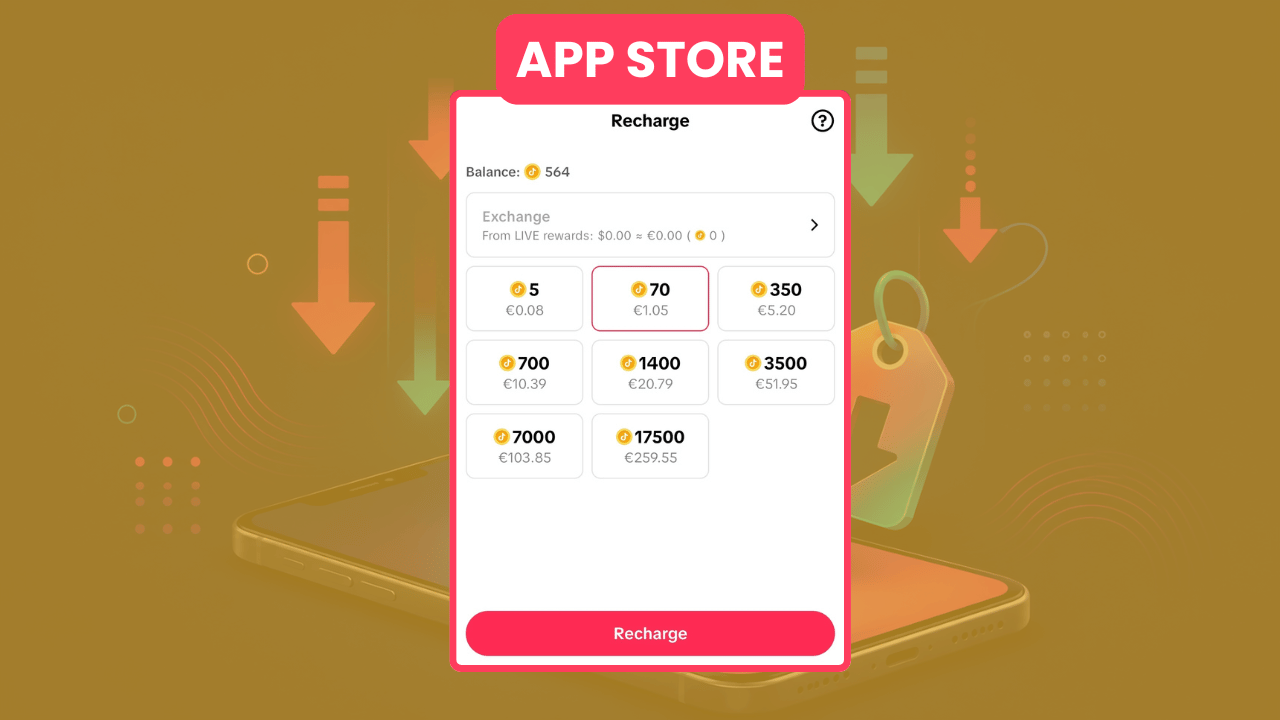
Here’s something TikTok doesn’t advertise loudly, but that’s worth understanding: when you buy coins through the iOS or Android app, you’re paying more than you need to.
Why? App store fees.
Apple’s App Store and Google Play both take a commission on in-app purchases — typically around 15–30% of the transaction. TikTok, like every other app, has to factor that cut into its pricing. So when you tap “Buy Coins” inside the TikTok app on your phone, those prices already reflect the platform fee that’s built in to cover Apple or Google’s take.
When you buy through TikTok’s website instead, that middleman disappears. TikTok can charge you less because there’s no third party taking a percentage. In practice, this can mean savings of anywhere from 10% to 30%, depending on your region and the coin package you’re buying.
This isn’t unique to TikTok — Spotify, Netflix, and countless other services have pushed users toward web-based purchases for exactly this reason. TikTok just happens to be less obvious about it.
How TikTok Pricing Works by Country tiktok-pricing-by-country
TikTok uses regional pricing, which means the cost of coins is not the same everywhere in the world. This is actually pretty common among global digital platforms. The price you see in the US is different from what someone in Brazil, Argentina, Turkey, or India sees.
These differences come down to several factors:
- Local purchasing power — TikTok adjusts prices based on economic conditions in each market
- Currency exchange rates — Coins are priced in local currency, and the conversion can work in your favor depending on the current rate
- Competitive dynamics — In markets where TikTok is fighting harder for users, pricing may be more aggressive
- Tax treatment — VAT and digital services taxes vary massively by country
What this means practically: the same 1,000-coin bundle might cost the equivalent of $1.29 USD in one country and $1.99 in another. That gap is significant if you’re a heavy sender of gifts during life.
Argentina, Turkey, and certain Southeast Asian markets have historically shown lower coin prices relative to the US dollar — though this can change as exchange rates shift and TikTok updates its pricing.
Cheapest Way to Buy TikTok Coins cheapest-way
So what’s actually the cheapest way to do this? Let’s be direct.
The single most reliable method is to buy coins through TikTok’s web recharge page (www.tiktok.com/coin) using a desktop or mobile browser, not the app.
This alone can save you 15–20% compared to buying through the iOS or Android app, because you’re bypassing Apple’s and Google’s fees entirely. TikTok passes that saving on to you — the coin packages on the web are noticeably better value.
Beyond that, some people explore regional pricing differences. Buying coins through an account set to a country with lower prices (like Argentina) can mean even bigger savings — but this comes with caveats we’ll get into shortly.
Here’s the priority order for saving money:
- Buy through the TikTok website — Best baseline approach, safe and easy
- Use a credit or debit card directly — Avoid third-party fee layers
- Choose larger bundles — TikTok typically gives better coin-per-dollar rates on larger packages
- Check for occasional TikTok promotions — The platform occasionally runs bonus coin events, especially around major holidays
How to Buy TikTok Coins Without App Store Fees without-app-store-fees
Cutting out Apple and Google is simpler than it sounds. You don’t need to do anything technical or risky. Here’s how:
On a computer:
- Go to
tiktok.comin your browser - Log in to your account
- Click your profile icon, then select “TikTok Coins” or navigate to the recharge page
- Choose your coin bundle
- Select your payment method and complete the purchase
On a mobile browser (not the app):
- Open Safari, Chrome, or any mobile browser
- Go to
tiktok.comand log in - Navigate to the coin recharge section
- Purchase as normal
The key thing here is that you’re using the website — not the TikTok app. Even on mobile, as long as you’re in a browser and not the app itself, you avoid the app store fee structure.
One thing to note: some users report that TikTok’s mobile website occasionally redirects to the app. If that happens, use a desktop browser or look for “request desktop site” in your mobile browser’s settings.
TikTok Coins Web Recharge Explained web-recharge
Web recharge is the phrase people use for buying TikTok coins directly through the TikTok website rather than in-app. It’s not an unofficial term, actually, how many users and even some TikTok support documentation describe the process.
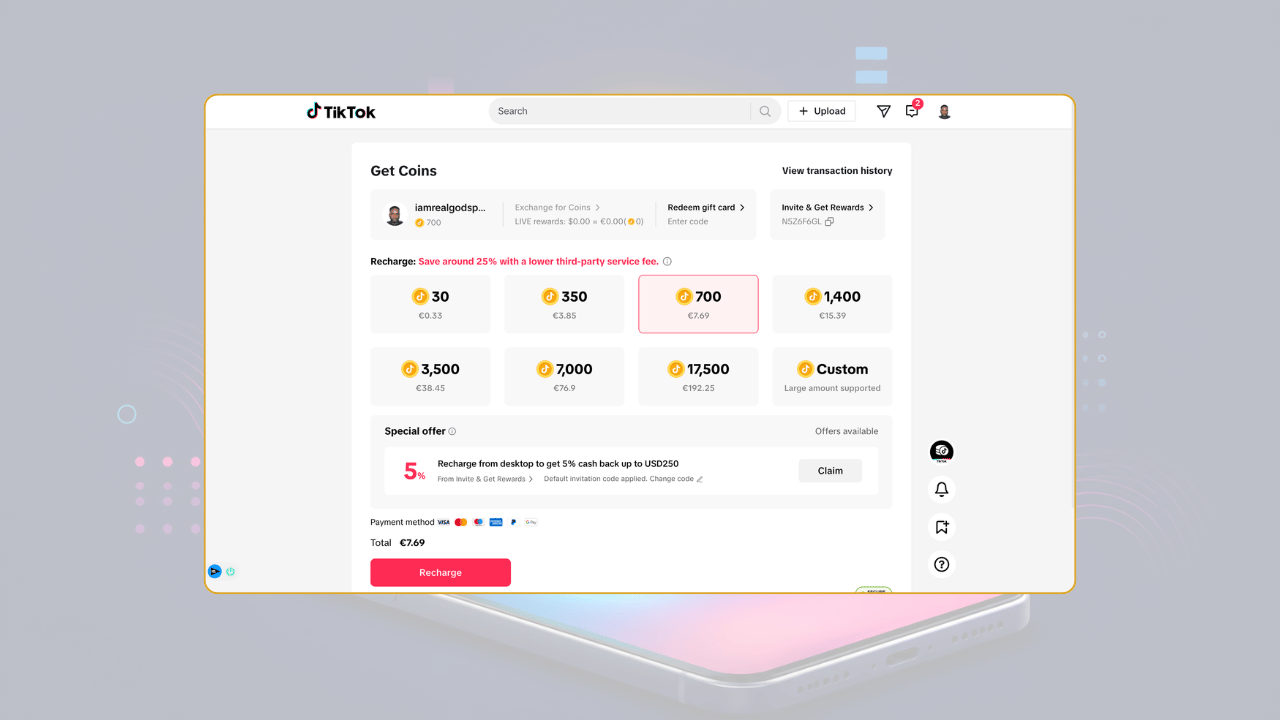
The web recharge page at tiktok.com/coin It is designed to be straightforward. You’ll see the available coin bundles, current prices, and payment options all laid out clearly. It’s the same TikTok account — any coins you buy here go directly into your TikTok wallet and appear immediately.
A few things worth knowing:
- Your account is the same. You’re buying coins for your existing TikTok account. There’s no separate account or anything like that.
- Coins appear instantly. Usually within seconds of completing the purchase, your coin balance updates.
- Payment options may differ. The web version sometimes offers more payment methods than the in-app version, including PayPal in some regions.
- Prices are displayed in your local currency. TikTok detects your location and shows prices accordingly.
TikTok Coin Recharge: USA vs Argentina usa-vs-argentina
This is where things get interesting — and a little more nuanced.
Argentina has become something of a legend in digital pricing circles. Due to Argentina’s ongoing currency situation and how TikTok has historically priced coins there relative to the dollar, the effective cost of coins in Argentina has sometimes been dramatically lower than in the US. We’re talking differences that can reach 40–60% or more.
Here’s the basic comparison:
| Region | 70 Coins (approx.) | 700 Coins (approx.) | 7,000 Coins (approx.) |
|---|---|---|---|
| USA | $0.99 USD | $9.99 USD | $99.99 USD |
| Argentina | $0.40–0.60 USD equivalent | $4.00–5.50 USD equivalent | $40–55 USD equivalent |
Note: These are approximate figures based on historical pricing and current exchange rates. Prices change and vary.
The catch? To buy at Argentina prices, you’d need an account registered in Argentina, an Argentine payment method, and ideally an Argentine IP address. Most foreign cards don’t work directly, and TikTok does monitor for abuse of regional pricing. People use VPNs to access these prices, but it’s not risk-free.
The US pricing, on the other hand, is stable, predictable, and available to everyone. For most people, the web recharge route in their home country is the practical smart move. The Argentina path is more complex than it looks.
Is Buying TikTok Coins Through the Website Cheaper? website-cheaper
Yes — in almost every case. The numbers are consistent across regions and coin bundle sizes.
Here’s why the gap exists to put it simply: Apple charges developers up to 30% on in-app purchases. Google Play charges up to 30% as well, though they’ve reduced this to 15% for many smaller developers. TikTok is not a small developer. They pay a full commission.
When you buy through the website, TikTok processes the payment itself — through Stripe, PayPal, or its own payment infrastructure. There’s no middleman taking a 15–30% cut. That savings flow to you in the form of more coins per dollar.
Typical saving on web vs in-app: 10% to 25%, depending on the bundle size and your region.
For heavy coin buyers, streamers, super-fans, people who send large gifts regularly — this adds up to real money over time. If you spend $50/month on coins, saving 20% means you’re getting $10 back every month, or $120 over the course of a year. Just from switching where you click.
Can You Buy TikTok Coins With PayPal? paypal
Yes, in many regions — but it depends on where you are and what version of the site you’re accessing.
PayPal availability on TikTok’s coin recharge page varies by country. In the United States, PayPal is typically available as a payment option on the web recharge page. In some other regions, it may not appear.
To check if PayPal works for you:
- Go to
tiktok.com/coinon a desktop browser - Select a coin bundle
- Look at the payment options listed
If PayPal appears, you’re good. If it doesn’t, your region may not support it — in which case, a credit/debit card is the standard option.
Using PayPal does offer a few advantages:
- Buyer protection — PayPal disputes can be easier to file than credit card chargebacks in some cases
- No card details shared — Your card number stays with PayPal, not directly with TikTok’s payment system
- Faster checkout — If your PayPal is already set up with a balance or card
One thing to avoid: using PayPal through unofficial reseller sites to buy TikTok coins. These are different from buying directly from TikTok with PayPal and carry risks we’ll cover below.
Best Payment Methods for TikTok Coins payment-methods
In rough order of reliability and convenience:
1. Credit or debit card (via TikTok’s website). The most universally available option. Works in virtually every supported region. Usually the smoothest experience.
2. PayPal (where available) Good if you prefer PayPal’s buyer protection and don’t want to enter card details on another platform.
3. Google Pay / Apple Pay Available in some regions on the web — though ironically, using Apple Pay on the website still avoids the App Store commission, as it’s a different payment flow.
4. Carrier billing / mobile top-up Some regions support billing coins directly to your phone bill or mobile top-up balance. Convenient, but sometimes adds fees from the carrier.
What to avoid:
- Gift cards from unknown third-party sites
- Cryptocurrency payments on unofficial platforms
- Peer-to-peer transfers to “coin resellers.”
Safe vs Unsafe TikTok Coin Sellers safe-vs-unsafe
This section matters. As TikTok coins have become more valuable (and as creators have built real income streams around them), a market for third-party coin sellers has grown up around it. Some of these are legitimate; many are not.
Generally safe:
- TikTok’s official website (
tiktok.com/coin) — Always safe, always legitimate - TikTok’s in-app purchase system — Safe, just more expensive
- Official gift card retailers — Where TikTok offers gift cards through retailers like Amazon or physical stores, these are legitimate
Risky or outright scams:
- Random reseller websites claiming to sell coins at massive discounts
- Social media accounts offering “cheap TikTok coins” in exchange for account access or PayPal payments
- Discord servers or Telegram groups with coin deals
The red flags for scam operations are usually the same:
- Prices that seem too good to be true (70%+ off with no explanation)
- Asking for your TikTok login details
- Using third-party payment apps like Venmo, Cash App, or Zelle with no recourse
- No clear refund or support policy
Losing your account — or your money — to a scam is a very bad trade for saving a few dollars on coins. Stick to official channels.
Are VPNs Worth Using for TikTok Coins? vpns
VPNs come up constantly in discussions about cheap TikTok coins because of the regional pricing differences we mentioned. The logic is appealing: connect to Argentina (or Turkey, or India), buy coins at local prices, disconnect.
In practice, it’s more complicated than that.
The problems with the VPN approach:
- Payment method mismatch — TikTok’s payment system often checks the billing address on your card against the region. A US credit card trying to purchase at Argentine prices frequently gets rejected.
- Account risk — TikTok’s terms of service prohibit circumventing regional pricing. Accounts that are flagged for this can be suspended or permanently banned. Is saving $20 worth risking your account?
- It doesn’t always work — TikTok has gotten smarter about detecting VPN use for purchasing. What worked a year ago may not work today.
- Local payment methods required — To really access Argentine pricing, you often need an Argentine debit card, bank account, or local payment platform (like Mercado Pago). Getting access to those legitimately from outside Argentina is not straightforward.
The verdict: For most people, the VPN route is not worth the hassle, risk, or technical complexity. The web recharge method — simply buying on the website in your own country — gives you real, meaningful savings without any of these headaches.
Common Mistakes People Make When Buying Coins common-mistakes
Even once people know that web recharge is cheaper, there are a few avoidable errors that cost them money or create problems.
Mistake 1: Buying through the app out of habit The app is what you use constantly, so it’s natural to tap “buy coins” there. But changing where you recharge coins takes 90 seconds and consistently saves money.
Mistake 2: Buying small bundles repeatedly. TikTok’s pricing is tiered. The smallest bundles tend to have the worst coin-per-dollar rate. If you know you’re going to use coins regularly, buying a larger bundle less often is almost always a better value.
Mistake 3: Falling for “bonus coin” promotions from unofficial sources. TikTok itself runs legitimate bonus events. Unofficial sites claiming to offer bonus coins are a red flag — they’re usually either scams or ToS violations waiting to happen.
Mistake 4: Not checking TikTok’s own promotions. TikTok does occasionally offer legitimate bonus coins for purchases made during specific periods. These show up in the app or on their website. Timing a large purchase around these events is a smart, safe way to get more value.
Mistake 5: Sharing account credentials. Some services claim they need your TikTok username and password to “top up” your coins. No legitimate service needs your login. TikTok coin purchases are attached to your account automatically when made through official channels.
How TikTok Creators Benefit From Gifts creator-benefits
Understanding why people buy coins in the first place also helps explain why the coin economy is worth engaging with thoughtfully.
When you send a gift to a creator, TikTok converts those coins into diamonds — TikTok’s internal currency for creators. Creators can then convert diamonds to real money through TikTok’s withdrawal system, though they don’t get the full value back. TikTok takes a cut (roughly 50% or more), so a gift that costs you $1 in coins might net a creator $0.40–0.50 in actual earnings.
That said, for many creators — especially those in regions where TikTok Live gifting is culturally popular, like Southeast Asia and parts of Latin America — gifts are a significant income stream. Some full-time TikTok Live creators make thousands of dollars monthly from gifts alone.
When you buy coins more efficiently (through the website, in larger bundles, during promotions), you stretch your fan budget further. A creator receives the same value from your gift regardless of how cheaply you acquired the coins.
TikTok Coin Prices Comparison Table
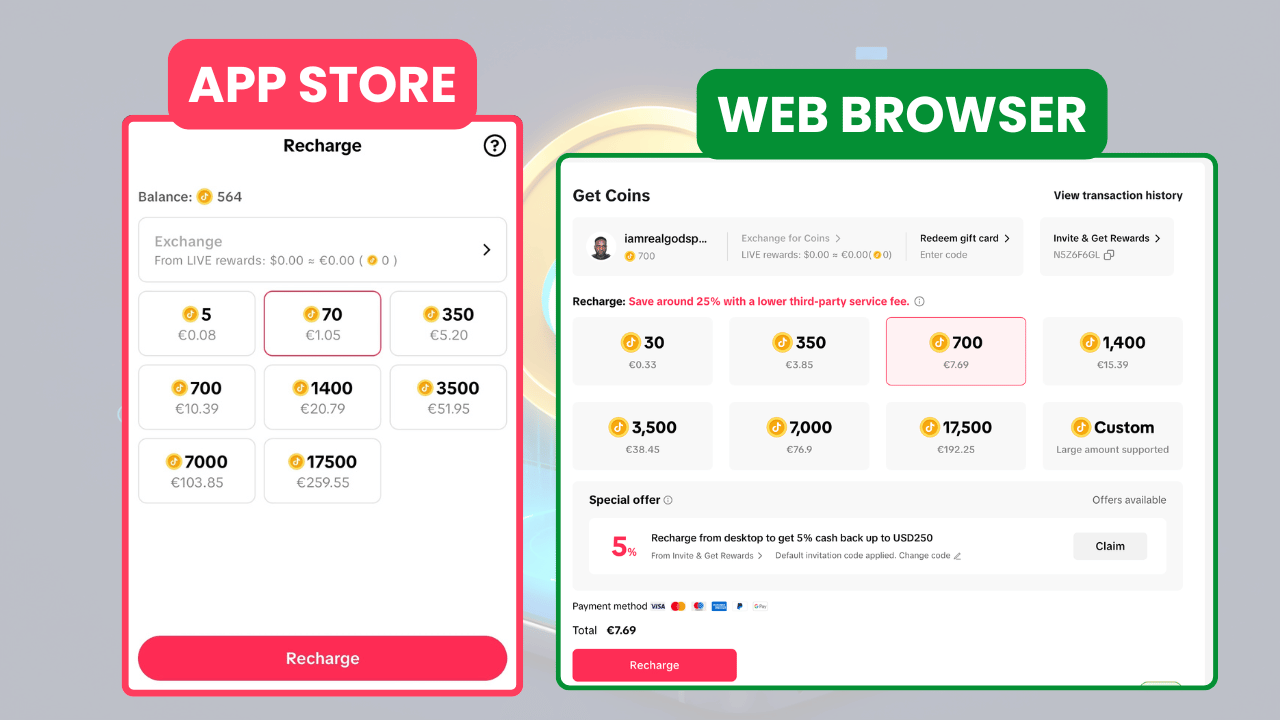
Here’s a general overview of how coin bundles are typically structured. Prices are in USD for US accounts and are approximate — TikTok does adjust these periodically.
| Coin Bundle | In-App Price (iOS/Android) | Web Price (approx.) | Savings |
|---|---|---|---|
| 70 coins | $0.99 | $0.79–0.89 | ~10–20% |
| 350 coins | $4.99 | $3.99–4.49 | ~10–20% |
| 700 coins | $9.99 | $7.99–8.99 | ~10–20% |
| 1,400 coins | $19.99 | $15.99–17.99 | ~10–20% |
| 3,500 coins | $49.99 | $39.99–44.99 | ~10–20% |
| 7,000 coins | $99.99 | $79.99–89.99 | ~10–20% |
Note: Prices vary by region, change over time, and may be affected by promotions. Always check the current prices directly on TikTok’s website.
The pattern is consistent: web prices are measurably lower. And as the bundle size grows, the absolute dollar savings get more meaningful.
Step-by-Step Guide to Buying TikTok Coins Cheaply
Here’s the practical, actual process — no fluff.
Step 1: Open a desktop browser (Chrome, Firefox, Safari). Don’t open the TikTok app. Go to a regular web browser.
Step 2: Go to tiktok.com and log in. Use your normal TikTok username and password.
Step 3: Navigate to the coin recharge page. Click your profile picture in the top right, then look for “TikTok Coins” in the dropdown. Alternatively, go directly to tiktok.com/coin.
Step 4: Choose your bundle. Look at the coin-per-dollar ratio for each package. Generally, larger bundles offer better rates. Buy what you’ll realistically use — don’t over-buy just for the marginal saving.
Step 5: Select your payment method. Choose credit/debit card or PayPal (if available). Enter your payment details or log in to PayPal.
Step 6: Confirm and complete the purchase. Review the total, confirm, and complete the transaction. Your coins should appear in your TikTok wallet within seconds.
Step 7: Verify your balance in the TikTok app. Open the TikTok app and check your coin balance. It should reflect the purchase immediately.
That’s it. The whole process takes under five minutes once you’ve done it once.
Is It Legal to Buy TikTok Coins in Other Regions? legality
Technically, TikTok’s terms of service restrict accounts to purchasing based on their registered region. Using workarounds to access lower regional pricing isn’t explicitly illegal in most jurisdictions — it’s a terms of service issue, not a criminal one. But that distinction matters less when TikTok can suspend or ban your account for it.
Legally, the situations where you’d face actual legal risk are narrower: buying stolen coins, participating in account fraud, or using fraudulent payment methods. Those cross into actual legal territory.
For ordinary users, the risk is account suspension, not legal prosecution. And for most people, that’s risk enough.
The cleanest, safest approach remains buying through TikTok’s official website in your own region. You get real savings without any ToS complications.
FAQs About TikTok Coins
1. Why are TikTok coins cheaper on the website than in the app?
When you buy through the iOS or Android app, Apple and Google take a 15–30% commission on the transaction. TikTok factors this into in-app prices. Buying on TikTok’s website bypasses that commission, which is why web prices are lower.
2. How much can I save by using the TikTok web recharge instead of the app?
Typically, 10–25%, depending on your region and bundle size. For high-value bundles, savings can reach $20 or more on a single purchase.
3. Can I buy TikTok coins with PayPal?
Yes, PayPal is available as a payment method on the TikTok web recharge page in many countries, including the US. It’s not universally available, so check the payment options when you go to checkout.
4. Is it safe to use a VPN to buy TikTok coins at lower regional prices?
It’s risky. TikTok monitors for this; your payment card may be rejected due to a regional mismatch, and your account could be suspended. For most users, the risk isn’t worth it.
5. Are there legitimate third-party sites to buy TikTok coins cheaper?
Very few legitimate options exist outside TikTok’s own systems. Be extremely skeptical of any site offering coins at deep discounts — many are scams or involve ToS violations.
6. What’s the best coin bundle to buy for value?
Larger bundles generally offer better coin-per-dollar ratios. If you’re a regular coin buyer, a 3,500 or 7,000-coin bundle bought on the website will give you the best rate.
7. Do TikTok coins expire?
TikTok coins don’t expire, but they’re non-refundable once purchased. Gifts sent from coins are also final — you can’t get coins back after gifting.
8. Can I use TikTok coins across different accounts?
No. Coins are tied to the specific account they were purchased for. You can’t transfer coins between accounts.
9. Why are TikTok coins cheaper in Argentina?
Argentina has historically had lower TikTok coin prices due to regional pricing adjustments based on local economic conditions and currency valuations. Accessing these prices from outside Argentina requires circumventing TikTok’s regional system, which carries account risk.
10. Does TikTok ever have sales or promotions on coins?
Yes, occasionally. TikTok runs bonus coin events — where you get extra coins on a purchase — especially around major holidays and events. These appear in the app and on the website. Timing purchases around these events is a legitimate way to get more value.
11. What happens if my coin purchase goes through, but my balance doesn’t update?
Wait a few minutes first — it usually resolves automatically. If not, contact TikTok support through the app and provide your payment confirmation. Don’t re-purchase before resolving the first transaction.
12. Can I get a refund on TikTok coins?
TikTok’s policy is generally no refunds on coins, especially if any coins have been used. Unused coins may be eligible for a refund in some regions under specific circumstances — check TikTok’s current policy in your region.
Final Verdict and Recommendations
Let’s bring it home.
The short version: buy your TikTok coins through the website, not the app. That one change is safe, legitimate, and consistently saves you 10–25%. No VPN, no regional tricks, no risk to your account.
If you want to maximize further:
- Choose larger bundles for a better coin-per-dollar rate
- Watch for TikTok’s own bonus coin promotions
- Use PayPal if available for payment flexibility and buyer protection
- Never buy from unofficial resellers — the risk is never worth the savings
For most TikTok users — fans who enjoy supporting creators during lives — the web recharge route is genuinely the most practical, risk-free optimization available. You don’t need to do anything exotic. Just change where you tap “buy.”
For creators reading this: your fans’ coins fund your content. When they can stretch their budget further through smart purchasing, you ultimately benefit too — it’s in everyone’s interest for the gifting economy to be as friction-free as possible.
And if you’re new to all of this: start with a mid-size bundle on the website, see how the process feels, and go from there. Once you’ve done it once, it becomes second nature.
Thank you for taking the time to go through and learn how to buy TikTok coins and recharge your coins in cheaper and easier ways to do it, without feeling. Let us know if it was helpful to you in the comments below the blog.
You can check out our blog and how you can learn about free online businesses that can help you earn income online with a step-by-step guide for free.